We use essential cookies to make this site work. With your permission, we also use optional cookies and similar technologies, including those from third parties, to understand, improve and personalise your experience.
Your first few minutes with StratNav depend on how you arrived. You may be starting a new strategy of your own, or joining a project that a colleague or consultant has already shared with you.
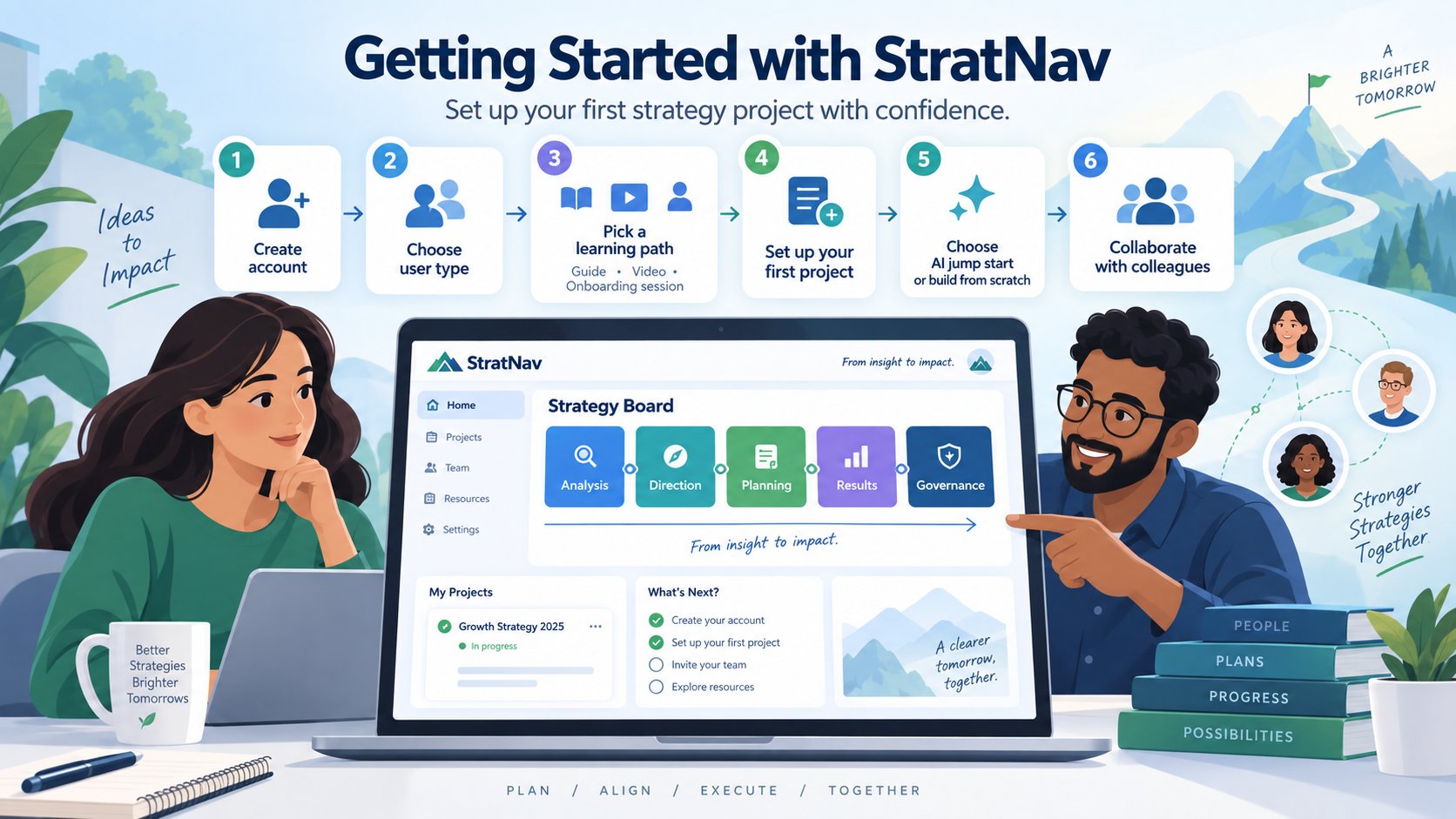
StratNav recognises the difference. It asks a few questions to tailor your experience, offers several ways to learn the platform, and then takes you either through setting up a project or straight into the project you were invited to.
Create your account
You can create an account with an email address and password, or sign in with Google. A free account does not require a credit card and has no time limit.
Once you have signed up, StratNav checks whether anybody has already invited that email address to a project. This determines which of two routes you follow.
If somebody shared a project with you
StratNav connects your new account to any outstanding invitations sent to your email address. You enter the existing project rather than receiving an additional blank project.
The person who invited you will have chosen your level of access. You may be able to administer the project, contribute content, add comments or view it without making changes. You can see everything within the shared project, but you cannot see the owner’s other projects unless they share those with you too.
Make sure you sign up using the same email address that received the invitation. Otherwise, StratNav will not be able to match the invitation to your new account.
If you signed up independently
StratNav creates an empty first project for you. It will then guide you through the few decisions needed to give that project a useful starting point.
Tell StratNav how you plan to use it
The first question asks what type of user you are. You can choose:
A business leader or employee developing and executing strategy within an organisation
A consultant or adviser working on strategies for clients
A startup founder
A student learning about strategy
An academic or educator teaching strategy
This is not a permanent label. It gives StratNav useful context so its guidance and AI responses better match the work you are doing.
If you arrived through a page intended for consultants, business leaders or founders, StratNav may already know the answer and save you this step.
Choose how you would like to get started
People learn new software in different ways, so StratNav does not force everyone through the same product tour. Instead, it asks you to choose an induction option.
Read the Quick Start Guide
The StratNav Quick Start Guide explains how to create a project, work with strategy models, use the Strategy Board and get help.
Choose this if you prefer written instructions that you can follow at your own pace.
Watch the Quick Start Video
The Quick Start Video gives you a guided introduction in under four minutes.
Choose this if you want to see the main parts of StratNav before you begin using them.
Book a free onboarding session
Business leaders and consultants can schedule a free one-hour Teams or Zoom call. This is useful if you want to discuss your situation, understand how to structure your projects or see how StratNav could fit an existing strategy process.
You can also schedule a StratNav demo if you would like a broader introduction before deciding how to proceed.
Dive straight in
If you prefer to learn by doing, you can go straight into the application. On-screen prompts, contextual help and recommendations will guide you as you work.
Your choice is not final. The welcome email includes the induction options, so you can watch the video, read the guide or arrange a session later.
Set up your first project
If you signed up independently, StratNav next asks what your first project is for. The main choices are:
A new strategy for an existing business
An existing strategy that now needs to be executed
A startup
A personal development plan
You may also see a direct starting point if you arrived through a page about a particular tool, such as SWOT, PESTEL, a Business Model Canvas, Lean Canvas, Strategy House or Porter’s Five Forces.
Your answer helps StratNav select the most useful starting model. For example, a startup and an established business creating a new strategy do not necessarily need to begin in the same place.
Name the organisation
For most business strategy projects, StratNav asks for the organisation’s name and, optionally, its website address.
Providing the website can help StratNav understand the organisation and support AI-assisted features. You can skip this step and add the information later.
A personal development plan does not require an organisation.
Name the project
Next, give the project a recognisable name. It might be:
Strategy for ABC Incorporated
Vision 2030
IT Strategy for XYZ Enterprises
My Personal Development Plan
A clear name becomes more useful when you create additional projects or invite colleagues. It helps everybody confirm that they are working in the right place.
You can skip this step or rename the project later.
Choose whether to start with AI
For some new-strategy projects, StratNav may offer two ways to begin:
Jump Start with AI uses the organisation’s public website and web search to suggest basic information about the organisation, its competitors and relevant external trends.
Build from Scratch gives you a blank project so you can enter your own research and insights.
AI-generated material is a starting point, not an authoritative description of the organisation’s strategy. Review it critically, correct anything that is inaccurate and add the knowledge that only your team has.
Where StratNav takes you next
After setup, StratNav takes you to a suitable first model or to the Strategy Board.
The Strategy Board is the centre of each project. It organises the work into five connected areas:
Analysis builds a shared understanding of the organisation, its market, competitors and environment.
Direction describes where the organisation intends to go.
Planning turns that direction into initiatives, actions, responsibilities and deadlines.
Results tracks whether the strategy is producing the intended outcomes.
Governance supports the whole process with tools for stakeholders, meetings, risks, assumptions, issues and decisions.
You do not have to complete every model or follow one rigid sequence. StratNav recommends useful next steps based on your project, but you can move around the Strategy Board and use the tools that suit your situation.
If you joined a shared project, much of this work may already exist. In that case, start by looking around the Strategy Board and checking what the project owner has asked you to review or contribute.
Your welcome email sequence
After registration, look out for your welcome email. It repeats the induction options, so you do not need to stop your work to read a guide or watch a video immediately. Check your spam or junk folder if it does not arrive.
The messages you receive can reflect how you joined StratNav, the type of user you selected and the induction option you chose. Someone joining a consultant’s shared project may therefore receive a different experience from someone who signed up independently to create a new strategy.
The sequence is there to help you continue from where you left off, introduce useful features at a manageable pace and point you towards further help. You can reply to an email from StratNav if you need assistance.
Getting help
You never need to remember where every feature lives.
Start with How to use StratNav, which explains the Strategy Board, projects, collaboration, reporting, integrations and the different forms of help available.
Inside StratNav, you can also:
Select the question-mark icon for help related to the page you are viewing
Follow the contextual prompts at the top of the screen
Hover over unfamiliar controls to see explanatory tips
You can return to the Quick Start Guide or video whenever you need a refresher.
A useful first session
You do not need to build a complete strategy on your first visit. A good first session is enough to establish your starting point:
Choose the type of user that best describes you.
Select an induction option.
Create or open your first project.
Give the project a clear purpose and name.
Look around the Strategy Board.
Complete one relevant model or respond to the work your colleague shared with you.
Follow the on-screen recommendation for what to do next.
If you are working on a strategy with other people, invite them early. Strategy improves when the people responsible for understanding, deciding and delivering it can work from the same evidence and see how their contributions fit together.
You can create a StratNav account using an email address and password, or sign in with Google. The free account requires no credit card and has no time limit.
What happens if I have been invited to a StratNav project?
StratNav connects your new account to outstanding invitations sent to your email address and takes you into the shared project, rather than creating an additional blank project.
Do I need to use the same email address as my StratNav invitation?
Yes. Sign up with the email address that received the invitation so StratNav can match the invitation to your account.
What access can I have in a shared StratNav project?
Your access level is chosen by the person who invited you. You may be able to administer the project, contribute content, add comments or view it without making changes.
What happens if I sign up for StratNav independently?
StratNav creates an empty first project and guides you through the decisions needed to give it a useful starting point.
What user types can I select in StratNav?
You can identify yourself as a business leader or employee, consultant or adviser, startup founder, student, or academic or educator. This helps StratNav tailor its guidance and AI responses.
How can I learn to use StratNav?
You can read the Quick Start Guide, watch the Quick Start Video, book a free onboarding session if you are a business leader or consultant, or dive straight into the application with on-screen guidance.
Can I change my StratNav induction option later?
Yes. Your welcome email includes the induction options, so you can read the guide, watch the video or arrange a session later.
What types of first project can I create in StratNav?
You can create a project for a new strategy for an existing business, execution of an existing strategy, a startup, or a personal development plan.
Do I need to provide an organisation name and website address?
For most business strategy projects, StratNav asks for an organisation name and optionally a website address. You can skip the website and add it later. Personal development plans do not require an organisation.
Can I rename my StratNav project later?
Yes. You can skip naming the project during setup or rename it later.
What is the difference between Jump Start with AI and Build from Scratch?
Jump Start with AI uses an organisation's public website and web search to suggest basic information about the organisation, competitors and relevant external trends. Build from Scratch provides a blank project for your own research and insights.
Should I rely on AI-generated strategy material without checking it?
No. AI-generated material is a starting point, not an authoritative description of your organisation's strategy. Review it critically, correct inaccuracies and add knowledge from your team.
What is the StratNav Strategy Board?
The Strategy Board is the centre of each project. It organises work across Analysis, Direction, Planning, Results and Governance.
Do I have to complete every strategy model in a fixed order?
No. StratNav recommends useful next steps based on your project, but you can move around the Strategy Board and use the tools that suit your situation.
How can I get help in StratNav?
You can use page-specific help from the question-mark icon, follow contextual prompts, hover over controls for tips, ask the #StratNavi chatbot, search the article library or submit a support request through the help menu.
About the author
Chris C Fox is an independent business strategy consultant and founder of StratNav. He helps consultants scale their impact, supports C-suite leaders in executing enterprise-wide strategies, and equips founders to grow and adapt with confidence.
👉 Learn more about Chris and his work.
👉 Book a strategy call or try StratNav for free.
Share this on:
LinkedInTwitterFacebookEmail
Every time you share anything about StratNav with someone else, you help them to develop and execute better business strategies, and you help to support us and our ability to continue to make the platform even better for you. So it really is a win-win!